Showing posts with label GhostX Ultimate. Show all posts

Wednesday, January 8, 2014

GhostX Ultimate (Part Five)

Strengthen Stones
Last but not the least, I will need to talk about these peculiar items called "Strengthen Stones".
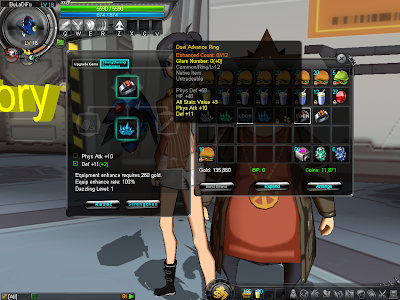
GhostX Ultimate - Upgrading Equipment But With Wrong Stone Rarity
The purpose of these Strengthen Stones is to upgrade or rather boost certain stats of items, namely those stats which are highlighted in yellow on an item's description.

However, you will need to use the correct Strengthen Stone on the right item. As in, the stone's rarity must at least match or be better than the item's. If you use the wrong ones, the upgrade will simply not be processed. (Yes...just like Somas, Rings and Necklaces, these Strengthen Stones also have the same rarity structure.)

To perform such an upgrade, just visit "Rapper Rapper" outside "Luna Laboratory", place the item (to be upgraded) and the strengthen stone in their proper slots, select which stat you wish to improve and hit the "Strengthen" button. (Yup, you may only choose ONE specific stat to improve for every upgrade attempt.)
GhostX Ultimate - CatalystGhostX Ultimate - Lucky Charm
If you so desire, you may purchase "Catalysts" or "Lucky Charms" from the in-game cash shop (using GKash) to boost the strengthening process (instead of a fixed improvement, you will now get a min-max possible range) and/or chances to succeed.

Enhanced Count and Glare Number
Simply put, every time you successfully strengthen an item, its "Enhanced Count" and "Glare Number" would each increase by 1. If a "Catalyst" was used, the "Glare Number" would increase by 2 instead.
GhostX Ultimate - Duel Advance Ring
So what these two does is that the "Enhanced Count" keeps track of the number of times you've strengthened the said item vs the maximum number of times that you can strengthen it.

The "Glare Number", on the other hand, determines whether equipping the item would result in your character "glowing" or not. The number outside the brackets represents the "Total Glare" accumulated on the item while the number inside tells you the "Glare" attributed by catalyst usage. (Or you can simply treat it as the number of times catalysts were used...since each catalyst used would give it 1 additional Glare.)
GhostX Ultimate - Aura Effect TableGhostX Ultimate - Aura From Glare Number
At the end of the day, if you total up the Glare Numbers of everything you have equipped on your character (plus depending on the average level of the equips), you will then have your character gain some sort of aura glow as per according to the table shown.

Where To Get Strengthen Stones
From what I know, General and High Class ones can be looted off monsters, but their drop rates are pretty low in my opinion. I've only gotten two of these stones so far.

Ultimate Strengthen Stones can be bought from Genova for 20,000 gold each. And as for Rarity and Legend stones, they can be obtained via upgrading High Class and Ultimate stones respectively.

Upgrading Strengthen Stones
To upgrade any Strengthen Stone, you will need to assemble/gather the following stuff.
  • A Strengthen Stone (well duh...^_^;)
  • Three "Source Items" (Somas, Rings or Necklaces) of equivalent or better rarity than the stone's
  • Ample Gold
Upon gathering the necessary items, just talk to Rapper Rapper and you can proceed with the stone upgrading like as shown.
GhostX Ultimate - Strengthen Stone Rarity To UltimateGhostX Ultimate - Strengthen Stone Ultimate To Legend
Each time you perform this upgrading process, the stone will be enhanced to its next better rarity. However, depending on the rarity of the source items used, the purity of the resulting stone will be altered.

Whether it improves or deteriorates will be reflected in the information window...so feel free to try out source items of different rarities. But do remember that these source items will be consumed, so please do not use anything that you can't afford to lose.
GhostX Ultimate - Purity 0 Strengthen StoneGhostX Ultimate - Purity 10 Strengthen Stone
As for what this purity rating does? Well, it merely affects the chances of strengthening an item, successfully, when you use the said strengthening stone in an upgrade attempt. The higher its purity, the better your chances of succeeding of course.

Now with that, I've come to the end of my introduction of GhostX Ultimate. Be sure to tune in next week as I begin the crash course on my next game.


Previous: GhostX Ultimate (Part Four)

Thursday, January 2, 2014

GhostX Ultimate (Part Four)

Fashion and Somas
Relatively speaking, if we were to relate the weapon of a character (in mmorpg terms) to the nanobots, then your defensive armors/equipments in GhostX Ultimate would be your fashion wear items.
GhostX Ultimate - Character Equip Window
Basically, there are altogether 10 slots found in your Character Equip Window. Out of these 10, 5 of them are designated as your "fashion wear" equips. These 5 affect your character's outward appearance and are named as "Head", "Tops", "Bottoms", "Gloves" and "Shoes".

3 are supposedly your "accessories" items. These are labelled as "Rings" and "Necklaces" and as far as I know, do not get reflected upon your character's visual outlook.

As for the last 2 slots, I'm not sure what they are for, but they seem pretty useless to me at the moment...since I still haven't seen any items that go into those slots.

Fashion Wear
Anyway, for these "fashion wear" equips, there are quite a few of them for you to choose actually. However, most of these needs to be acquired in a full set (Head, Tops, Bottoms, Gloves and Shoes of the same set) before they become meaningful, visually.
GhostX Ultimate - LuffyGhostX Ultimate - Sakura
For example, with the proper full set, you can dress yourself as famous characters like Luffy (in One Piece), Naruto and Sakura (in Naruto) or even as Tifa (in Final Fantasy VII: Advent Children).
GhostX Ultimate - Tifa
But unfortunately though, these "special" costumes can only be obtained using real life money means (purchasable from in-game cash shop using GKash).
GhostX Ultimate - Clothing Store Fashion WearGhostX Ultimate - Clothing Store Fashion Wear 1
For the rest of us, there's only the "Clothing Store" fashion wear for us to choose from. And though not as visually striking, they are still pretty hip and fashionable...so much so that if you mix and match it up a bit, you are still able to find your own unique style within the game.

(Do note that these fashion wear have their own level requirements. Your character needs to be of the appropriate level before you can wear them.)

Somas
To accommodate for the fashion wear style that a player may choose to retain, there comes the need to separate the "stats" of your defensive equipment from your fashion wear (so as to keep your defenses up-to-date whilst still being able to maintain the look that you desire). As such, this gave rise to a special item called the "Somas"...
GhostX Ultimate - Maid Chignon With Level 1 SomaGhostX Ultimate - Maid Chignon With Level 17 Soma
With these "Somas", what happens is that as you level up and find yourself faced with increasingly tougher monsters, all you need to do is merely to remove the outdated "Somas" within your "fashion wear" equips, put in the latest ones appropriate for your level and your all set, good to go.

However, as simple as it may sound, there are still a couple of things that you would need to know about them.
  • Soma Type
    GhostX Ultimate - Somas
    Somas are first of all divided into two types. The first type can only be fitted into "Tops" or "Bottoms" fashion wear. These are usually named as "XXX Soma's Truth" or something like that.

    The second type can only be fitted into "Head", "Gloves" and "Shoes" fashion wear. These are normally named as "XXX Soma's Charity" instead.
  • Soma Level
    Next, Somas also have a "level" aspect to them. (Not that they can actually be leveled, of course.)
    GhostX Ultimate - Level 4 SomaGhostX Ultimate - Level 6 Soma
    The level of a Soma not only governs the magnitude of the defenses and stats that they have, but also forms the basis of its usage requirement. The higher the level of the Soma, the better the defenses and stats found on them. However, its level requirement (of your character) will also be correspondingly higher as well.

    (When slotting a Soma into a fashion wear, the level requirement will take on whichever value that is higher, the Soma's or the fashion wear's.)
  • Soma Rarity
    Contrary to popular MMO games' color codes for rarity, the ones found in GhostX Ultimate is a bit peculiar in that green-colored items are actually higher and better than blue-colored ones in the rarity hierarchy. This same rule also applies to Soma rarity and thus we have the following hierarchy instead...
    GhostX Ultimate - Soma Rarity
    Naturally, the usual rules for rarity applies. With increasingly better rarity, the Soma's stats will also improve as well. That much is certain.
Removing And Inserting Somas
GhostX Ultimate - X-1GhostX Ultimate - Removing Soma
So after talking so much, just how exactly do you remove and insert a Soma? Well...to do that, you will first need to approach an NPC called "X-1" right outside of the "Medical Center".

After talking to him, choose the "Soma Disassemble" option, put in the fashion wear containing the Soma you wish to extract and hit the "Refine" button. (You will need to pay him a certain amount of "Coins". These "Coins" can be easily obtained by selling useless junks and those crystal pieces, Piece of Wind/Fire/Darkness etc.)
GhostX Ultimate - Inserting Soma
As for inserting a Soma, just drag and drop the new Soma from your inventory into the now emptied fashion wear and that will do.

Accessories
Since accessories do not affect your character visually, Somas aren't needed for them and thus the Soma System do not apply here. However, the rarity rule does.
GhostX Ultimate - General Necklaces
The more common (general) rings and necklaces can simply be purchased (with "Coins") from the Jewelry Store, but the rarer ones (high class and rarity) will need to be looted from monsters or earned from completing missions and clearing dungeons.
GhostX Ultimate - BP RingsGhostX Ultimate - PVP
Apart from that, these can also be bought from the Jewelry Store NPC using "BPs" (a form of currency). However, these "BPs" can only be obtained when you participate in PVP matches and win.


Previous: GhostX Ultimate (Part Three)Next: GhostX Ultimate (Part Five)

Thursday, December 26, 2013

GhostX Ultimate (Part Three)

Nanobots
Type
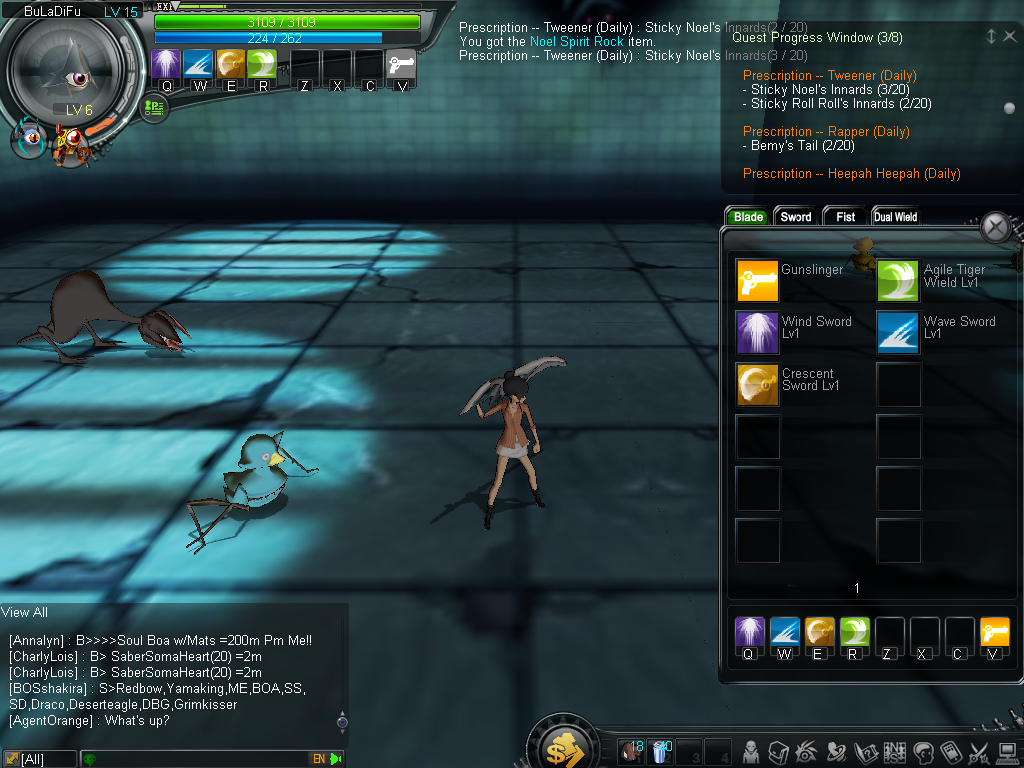
There are a total of seven types of nanobots available in GhostX Ultimate, Sword, Blade (a.k.a Knife), Fist (a.k.a Claw or Attach), Dual Wield, Mount (a.k.a Boarding), Gun and Bow (kept as such for lack of a better name).

Out of these, Sword, Blade, Fist and Dual Wield appears to be the primary types whereby
  • Sword-type nanobots seems designed to have fast and swift attacks coupled with a high Spirit stat. Hence, they are suitable for spamming skill attacks.
  • Blade-type nanobots seems to have a much slower attack pace, but they do have large swing attacks that cover a wide area. They usually have a high Strength stat and thus their normal attacks are very powerful and damaging.
  • Fist-type nanobots seems to be of the "tanking" type. While their attacks are pretty normal and short-ranged, they do boast of having high Stamina and Defense stats. They are able to stand in the frontline and withstand heavy punishment.
  • Dual Wield-type nanobots have high Agility. Their fighting style seems to revolve around taking an enemy out as fast as possible, one at a time, with their rapid attacking speed and high critical rates.

For Gun and Bow-type nanobots, these are more or less a sub-variant of the primary types. Gun nanobots are classified under Blade-type while the Bow nanobots fall under the jurisdiction of Dual Wield-type.
GhostX Ultimate - Magnum Blade ModeGhostX Ultimate - Magnum Form Change
Under normal usage, when you equip them, they are no different than the primary type nanobots in which they belong to. However, these nanobots have access to a special skill which allows them to "form change". Upon using this form changing skill, they will then morph into their alternate form, gun or "bow" (again because I couldn't think of a better term for it) mode.
GhostX Ultimate - Magnum Gun Mode
In this mode, the gun nanobots' normal attacks are changed to ranged and fires off just like a gun.
GhostX Ultimate - Bow ModeGhostX Ultimate - Using An Arrow Skill
The bow nanobots on the other hand merges the dual swords together to become some sort of a double-bladed sword or something. And even though its attacks are still melee, its reach is somewhat longer and it can start to use some skills that resembles shooting an arrow off a bow (hence the name).

Do note that the active skills that they can use (while in these modes) will also be restricted accordingly. For example, while in blade mode, the Magnum is free to use all blade-type active skills that the player has learnt/picked up, but not the gun related ones. On the other hand, while in gun mode, the player will only be allowed to use the gun related active skills but not the blade ones.

Finally, there's these mount-type nanobots which I've failed to put my finger on...since I've yet to obtain one.
GhostX Ultimate - Mount-type Nanobot
These nanobots appear to allow you to mount on them (when equipped) and lets you move around faster. However, I could not find any information on what sort of skills these mount-type nanobots possess. And neither could I find any screenshots or videos of them performing any form of attack. All I did find was an old, outdated video clip featuring a White Tiger (Mount Nanobot).

In this short video clip, all the person did was to make the nanobot and then proceeded to mount it. Nothing spectacular. However, at around 0:33 in the clip, it was shown that the nanobot had at least three skills at 3 different levels.

One seems to be a passive healing skill that triggers by chance. The second seems to be a kind of buff that temporarily raises the Maximum HP of all players within a fixed area while the last one is an active healing skill (which also targets all players within a fixed area).

However, due to the "agedness" of its skill interface, it might be wise to just take this with a pinch of salt. But an educated guess would be that mount-type nanobots are either incapable of fighting (since the "Character Skill Tree" doesn't even have anything that's related to them), or they could be another sub-variant kind just like gun and bow nanobots, or they could be those support/party-play kind which doesn't have any attack capability but plenty of support skills?

(I'm sorry I can't help you more on this, but eventually, when you do acquire one, you should be able to know what to do with them then...using the knowledge you have gained from the other nanobot types.)

Acquiring Nanobot Skills
Do you remember that in Part One I've mentioned that the overall gameplay feels like a "Pokémon Catch 'Em All" fest? Well...the nanobot skills are the very reason why its so.
GhostX Ultimate - Crescent Sword Level 1GhostX Ultimate - Unlocked New Skill
Basically, each and every nanobot in the game seems to have its own particular nanobot skill (can be an active skill, can be a passive skill) that it can impart onto the player. But in order to learn the skill, one has to first obtain that specific nanobot (by either making one or evolving into it from one of its predecessor forms, if any) and then proceed to fulfill its "Unlock" criteria.

For example, to learn the blade skill "Crescent Sword Level 1", you will first have to get yourself a "Black Shark" nanobot by either gathering the materials to make one yourself or via evolving into it from a "Tiger Shark".

Upon obtaining the "Black Shark", you will then only need to satisfy its unlock criteria by killing 40 monsters while using it and then you would have learnt the skill.
GhostX Ultimate - Agile Tiger Wield Level 2GhostX Ultimate - Dance of Claw Level 1
However, do note that not all of the skills are that straightforward to unlock. For instance, to learn "Agile Tiger Wield Level 2", one not only needs to know its predecessor skill "Agile Tiger Wield Level 1" (from a different nanobot, Proto), but one will also have to level the nanobot "Bone Dragon" to level 17.

And then there's always the pesky "Chance to Unlock" criteria, like for this skill called "Dance of Claw Level 1". To unlock this skill, you will need to keep using the nanobot to kill monsters until you unlock it by chance.
GhostX Ultimate - Blade SkillsGhostX Ultimate - Sword Skills
But the good news is that once the player has learnt the skill, you can use the skill while equipping any of the other nanobots...so long as its of the same type. Blade skills can be used by all blade-type nanobots, sword by sword-type nanobots, fist for fist-type nanobots and dual wield for dual wield-types.

However, for gun and bow skills, they can only be used by gun and bow nanobots respectively. Even though they may be categorized under their primary type in the skills list, a blade-type nanobot cannot use gun skills since it cannot morph into a gun mode in the first place. Likewise, bow skills cannot be used by all dual wield-types as not all of them would have a bow mode to utilize these skills.

For a list of which skills can be learnt from which nanobots, please visit:
GhostX Ultimate - Nanobot Skill List


Obtaining New Nanobots
There are quite a few ways for you to go about getting yourself a new nanobot.
  • Evolving
    Evolving is the most simple way for you to do so since it merely involves you leveling up the nanobot until its time for evolution. However, because its a 1 : 1 trade-off, you do not actually "gain" in nanobot numbers. Furthermore, the nanobot that you wish to acquire might not be in the "evolution path" of those existing ones that you have...so please take note of that.

    For a list of some nanobots' evolution paths, please refer:
    GhostX Ultimate - Nanobots
  • Crafting
    GhostX Ultimate - Nanobot Crafting
    Crafting is another way of getting yourself a new nanobot. (You may access this crafting interface by approaching Genova at the Luna Laboratory.) However, to craft a specific nanobot, you will first need to acquire its "recipe".

    One, by "Seed". In this method, all you will need to do is to acquire the nanobot's seed, right click on it to learn its "recipe".
    GhostX Ultimate - Nanobot SeedsGhostX Ultimate - Ripple Seed
    Different nanobot seeds can be obtained via different means. Some of them can be gotten from NPCs as a quest reward, some can be obtained from "Perfect Clearing" missions, some can be bought from NPCs while others are looted off monsters. (Do note that these seeds are tradeable so you can even buy them from other players too.)

    Two, by "Automatic Inclusion". For this option, what I meant is that so long as you possessed the nanobot at least once, you will automatically gain its "recipe". This situation will normally occur only via evolution means, combining or from cubes...as it isn't possible to trade nanobots.

    Well, once you have its recipe, you will then need to gather the needed materials in order to craft the nanobot.
    GhostX Ultimate - Nanobot Materials
    To find the source of monsters who will drop these materials, press "G" and click on "Recipes" at the bottom right. Under "Type", look for the specific nanobot that you want to craft and hit the "magnifying glass with a question mark" right beside each of the individual ingredients. It will then show you a list of monsters that will drop those ingredients, the monster's level and the location where you can hunt them.
    GhostX Ultimate - SoulsGhostX Ultimate - Soul 1%
    As for "Souls", these can be bought from Genova using "Gold", a form of in-game currency which you can earn from certain quests. Unlike "Coins", it is tradeable so you can also get it from other players when you trade and sell stuff.

    Souls come in varying qualities (1%, 10% and 100%). In order for you to craft, you would need to note the quality of the soul needed and its quantity. (So please make sure you buy the right ones.)

    However, even if you do manage to purchase the wrong ones, you may still rectify the error by splitting/stacking the souls and then right click to change its soul density.

    1 "Soul 100%" <-> 100 "Soul 10%"

    1 "Soul 10%" <-> 100 "Soul 1%"

  • Cubes
    GhostX Ultimate - Broken CubeGhostX Ultimate - Prototype Cube
    Whilst adventuring in GhostX Ultimate, you will often come across such things called "Cubes". What these cubes do is that they contain either a specific nanobot or a random one out of a select few (you will have to read its description to find out).
    GhostX Ultimate - Retrieving Nanobot From CubesGhostX Ultimate - Charging Up A Cube
    To extract the nanobot from its cube, you will again have to approach Genova and open up the "Nanobot Crafting" window. But instead of the "Create" tab, this time your gonna choose the "Random Pick" tab.

    Slot the cube into the box as shown in the screenshots and charge it up with souls accordingly...if it needs any. The amount of souls needed is reflected in the tube-like bar thingy on the left.

    To charge it up, select the soul (that your going to use) in the "Bag" window and click on the "Charge" button. Each "Soul 1%" will charge the cube up by 1. Each "Soul 10%" will charge it up by 100 and each "Soul 100%" will charge it by 10,000. (Naturally, you will have to adjust the density of the soul that your using as it won't accept the soul if it will overcharge the cube.)

    Anyway, once the cube is ready/fully charged, a "Refine Nanobot" button would appear. Just click on it to obtain your nanobot. However, do note that the nanobots obtained from these cubes may sometimes be too high level for your character to use, so be sure to check its "Use Level" first if you can't equip it.
  • Combining
    GhostX Ultimate - Nanobot SynthesisGhostX Ultimate - Invalid Combination
    When combining (or synthesizing) nanobots, what you do is to take Nanobot "A" and add it to Nanobot "B" to form a Nanobot "C". Simple as that...

    However, despite it being a simple task, you can't just take ANY nanobot and add it to another just like that. It will most probably not work and you will end up with the "Invalid Combination" message.

    Only by adding in the correct two nanobots, will you be shown with a "resulting" nanobot (from the merge) and the right to click on the "Nanobot Synthesis" button to proceed with the combination.

    In the past, during GhostX times, there used to be a lot of low level combinations available for us to play with. But ever since the upgrade to GhostX Ultimate, all of these combinations are no longer valid. They are all but replaced with only a dozen or so high level ones.

    (Do note that using this method, you will actually have a "reduction" in nanobot numbers...since you will only get one back after merging two together.)

Nanobot Personality
GhostX Ultimate - Obedient NanobotGhostX Ultimate - Silent Nanobot
Each nanobot apparently also have their own personality as well. And depending on the personality, the boost they offer upon its user (your character) would also differ.

GhostX Ultimate - Angry PersonalityEnhanced HP.
GhostX Ultimate - Arrogant PersonalityEnhanced hit rates.
GhostX Ultimate - Bragging PersonalityEnhanced GP.
GhostX Ultimate - Cool PersonalityEnhanced knockback rates.
GhostX Ultimate - Naive PersonalityEnhanced Spirit Defense.
GhostX Ultimate - Naughty PersonalityEnhanced critical rates but reduced Physical and Spirit Defense.
GhostX Ultimate - Obedient PersonalityEnhanced recovery rates of HP and GP.
GhostX Ultimate - Silent PersonalityEnhanced attack rates.
* This list is not exhaustive. There may be other personalities that I may have missed.

As far as I know, these personalities are determined upon "birth" (when you first create the nanobot) and does not get changed even when undergoing evolutions.

Managing Nanobots
GhostX Ultimate - Nanobot Storage
Lastly, the Nanobot Storage is where you would go to when managing your nanobots. It is at this place where you can select which three nanobots to bring along with you for your adventures as well as to delete unwanted nanobots.

But please note that owing to the way the system is coded, you cannot switch out the nanobot that is currently "In Use" directly. To swap it out, you may have to put in an interim nanobot, exit from storage, press "Spacebar" to switch to that interim nanobot before re-entering storage to take out the said nanobot (the one that was "In Use").


Previous: GhostX Ultimate (Part Two)Next: GhostX Ultimate (Part Four)